SEO for Therapists & Coaches who just launched a Website
Published May 2026
If we’ve worked together on your website, then you already know this: your site wasn’t just designed to look beautiful…it was built to be found.
At Sundai Studio, every Squarespace website I create comes with thoughtful, intentional SEO (search engine optimization) foundations already in place. We may have even worked with an SEO Specialist for more robust support!
But SEO isn’t a one-and-done moment. It’s a series of building blocks that continue to stack on top of one-another, creating a seriously powerful lead generation magnet for ideal clients.
The foundations are set, but you have a few more steps to take before you really start to see the magic take shape!
Let’s dive into it! ✨

Step 1: Understand where your SEO settings are on your website.
Consider this an MTV Cribs style tour of your Squarespace SEO Foundations:
When I hand over your website, every single page includes:
A strategic SEO title
A meta description aligned with your keywords
A clear and intentional H1 heading
Optimized images (so your site loads quickly and smoothly)
Alt text for accessibility and improved search visibility
Behind all of this is keyword research, choosing one or two intentional keywords per page so that everything from your headings to your descriptions is aligned and working together.
In the video below I walk-through where these elements are on your website and what areas of text to AVOID editing 🫣 and which areas of text are free to edit 👍:
Step 2: Connect your google tools.
To let Google know you exist and to start monitoring data, you’ll want to connect it to two essential (and free) tools from Google:
Google Analytics (watch this tutorial to set up your Google Analytics account >)
Google Search Console (watch this tutorial to set up your Google Search Console account >)
These tools might look a little technical at first glance, but you don’t need to master every detail. What matters is getting them set up!
Google Search Console is also the tool you will use to submit your sitemap so Google knows about your new website.🤠
Here’s a video tutorial walking through how to Submit Your Sitemap >
As you create new pages or blog posts you also will want to “index” any new pages, which tells Google (and all the robots) “hey, here’s something new”.
This video walks through how to Index your new pages to Google Search Console >
Step 3: Setup your monthly reporting.
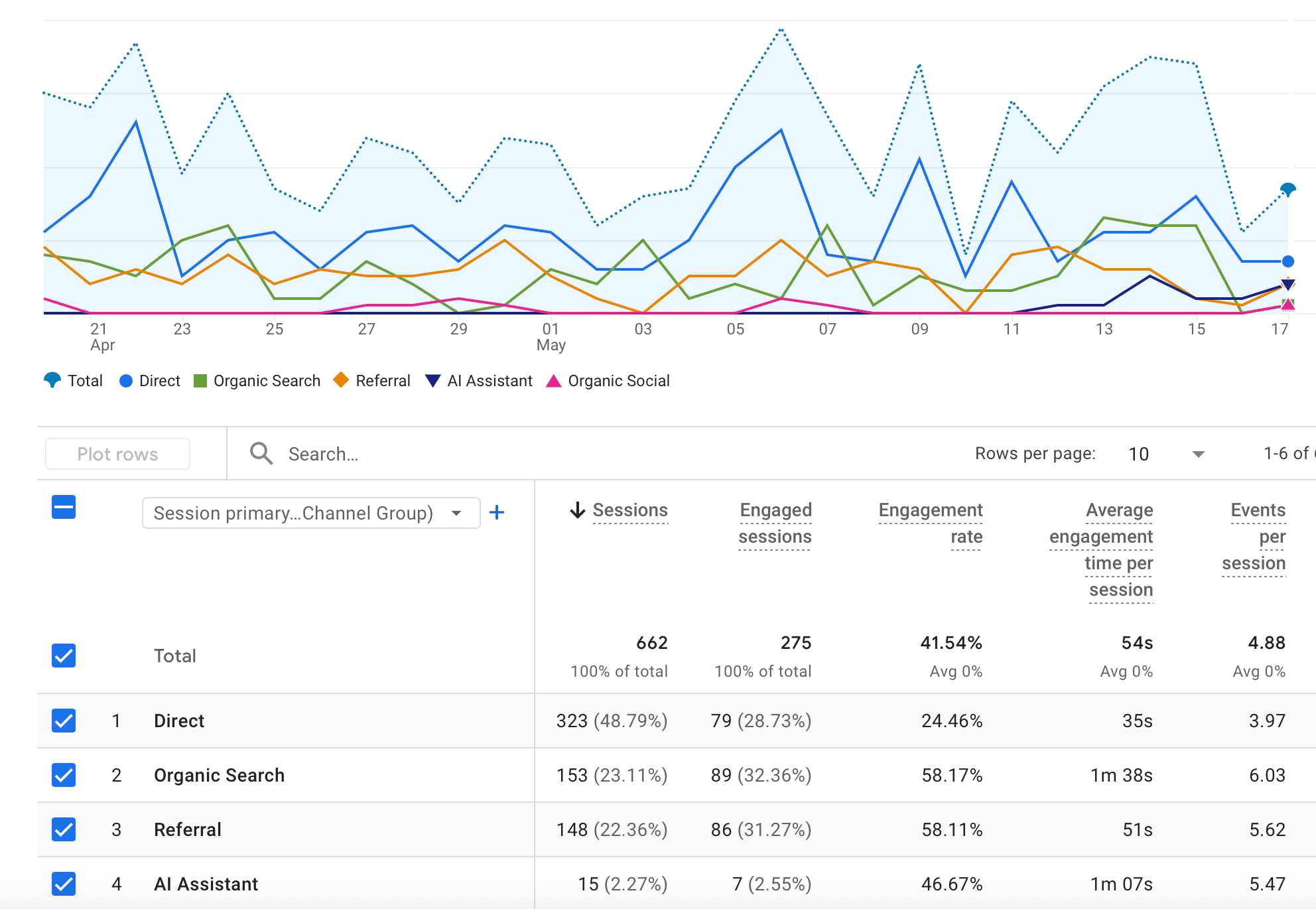
Once a month, take a few minutes to look at the last 30 days and document:
How many people are visiting your site.
Which pages they’re spending the most time on.
How long they’re staying.
What keywords are starting to bring people in.
This is enough to begin seeing patterns.
Those patterns start to guide you as you create new content or continue to edit any existing blogposts. 🥳
✦✦✦ Here’s a Google Doc for reporting >
Be sure to make a copy and save to your Google Drive to start using this doc.
Step 4: Grow your SEO with blogging
Google favors websites that are alive, sites that are updated, expanded, and evolving. One of the most effective ways to do this is through blogging.
For every individual blog post, here are the steps:
Duplicate your most recent blog post to create a new draft:
By duplicating a recent blog post you will automatically retain the “template” that was designed for you.
This will include a guideline for how many images to include, where to place buttons and calls to action. This will keep all of your blog posts consistent.
If you do not already have a Blog created on your site, and you’re a past client, I’d love to help you setup your Blog and first few blog posts during a Design Day. Feel free to inquire if that feels exciting to you!
Define your “call to action”:
Are you looking to promote a digital product, a specific service, or an upcoming event? Make this decision first. This will help you choose a topic and keyword for your new blog post. You want to write blog posts that:
Align with your services or offers
Reflect what your ideal client is searching for
And supports your larger content ecosystem
Then do keyword research: 🤓
One tool: Keysearch. Keysearch is my favorite keyword research tool - Join with a free trial or pay for one month and do all of your research for the year during that month. It’s well worth the price to get all of that info for your website. Get started with keyword research here >
✦✦✦ Watch this 7-minute Video Tutorial shows you how I conduct keyword research using Keysearch >
Write 1 new blog post a month:
Using your targeted keyword, write your blog post. Start with one post per month (at least 500 words).
Write your SEO Title and Meta description for this new blogpost.
As described briefly in that Keyword research video, your SEO Title should stay between 40-60 characters and contain your exact targeted keyword. Your meta description should stay between 140-155 characters and include your keyword as well — But you can write this meta description a bit more conversationally.
When those pieces are written, upload them to your website! This SEO Tour video walks through where you can find those settings.
Optimize Images; name them, shrink the size and add Alt Text:
For your blog posts you can use any of your branded photos or stock imagery. If you’re looking for new stock images, I recommend searching on Unsplash.com These images are free to use and by going through the website (instead of Squarespace) you’ll be able to follow the best practices and guidance below:
Any new image that you’re uploading to your website should:
Have a file NAME that includes a targeted keyword or at a minimum makes sense to someone reading it (aka It’s not ideal to upload “IMG345B.jpg". You want that photo to be titled something like “Therapist-in-California-Offering-EMDR-Therapy-Image1.jpg”).
Run the images through TINYJPG.com to shrink the file size as much as possible. Aim for below 500kb. Definitely under 1mb.
Include added “Alt Text”:
✦✦✦ Here’s a quick video tutorial on how to edit Alt Text automatically and manually >
Publish your blogpost and submit the page to Google Search Console
Now that your blog post is officially SEO optimized, you can let Google know that it’s been published!
As you create new pages or blog posts you also will want to “index” any new pages, which tells Google (and all the robots) “hey, here’s something new”.
✦✦✦ This video walks through how to Index your new pages to Google Search Console >
Go back and optimize old blog posts, when appropriate:
A blog post with SEO foundations doesn’t just live for a week; it grows over time. Because of this, you can revisit it, refine it, expand it, and strengthen it as it begins to rank and bring in traffic. For example, if you notice you’re getting a lot of views, but not a lot of “actions” taken - consider adding a few more buttons on the page!
Think of your blog as a body of work. If you notice trends in your data and you see that you can optimize an old blog post for better SEO rankings that go ahead and do that! You can add an “Originally published” date and a “Last updated” date at the top of any updated blog post.
How to setup your Google Business Profile and start collecting reviews.
Anyone can setup a Google Business Profile, however it’s especially ideal for those that serve local customers or regional customers (therapists who meet in-person with clients, I’m looking at you! 🤩).
How to setup your Google Business profile:
✦✦✦ Click here to get started and use this blog post as a great step-by-step guide. And start asking your clients or students to leave reviews for your Google Business page.
Be sure to ask your clients and customers for review on a regular basis. Note, that it’s best to ask in a consistent way throughout the year - Not just a “email blast” to past clients. Sometimes Google sees this as being “spammy”. Just add the “ask” to your client off-boarding client experience!
Are you interested in learning more or outsourcing SEO maintenance?
If you’re looking to invest in learning SEO to make it feel more second nature: I always recommend my business bestie and SEO Mentor Brittany Herzberg; she is an SEO Specialist with wonderful DIY tools and a group program called SEO and Grow. The best way to learn SEO is to practice it on a monthly basis. It’s in the “doing”, where the lessons fully integrate.
If you’re looking to outsource this SEO maintenance (and you’re a past or current client of mine) then send me an email! I can support you through Design Days or 3-month retainers. We can discuss options and next steps on a call! ✨

That’s it! Whether you’re a client reading this or you’re someone on the internet looking for some guidance, I hope this blogpost feels supportive for wherever you are in the process.
If we haven’t met yet, I’m Jena Thielges a Brand and Website Designer. I specialize in working with women who are coaches, therapists, healers and service providers. Founded in 2019 on seven years of agency experience, Sundai Studio is more than a brand and web design studio—it’s your energy, embodied in design. Because even your branding should feel aligned.
Check out my offers here and get in touch if you’re ready to book a free consult call!
Y O U M A Y A L S O E N J O Y …